How to translate a web page and keep its code blocks intact
In DualTrans, select the bilingual display mode and translate the page. It adds translations alongside the original prose and leaves code blocks in place, so you can still copy commands and examples.
Steps
Open a page with prose and code
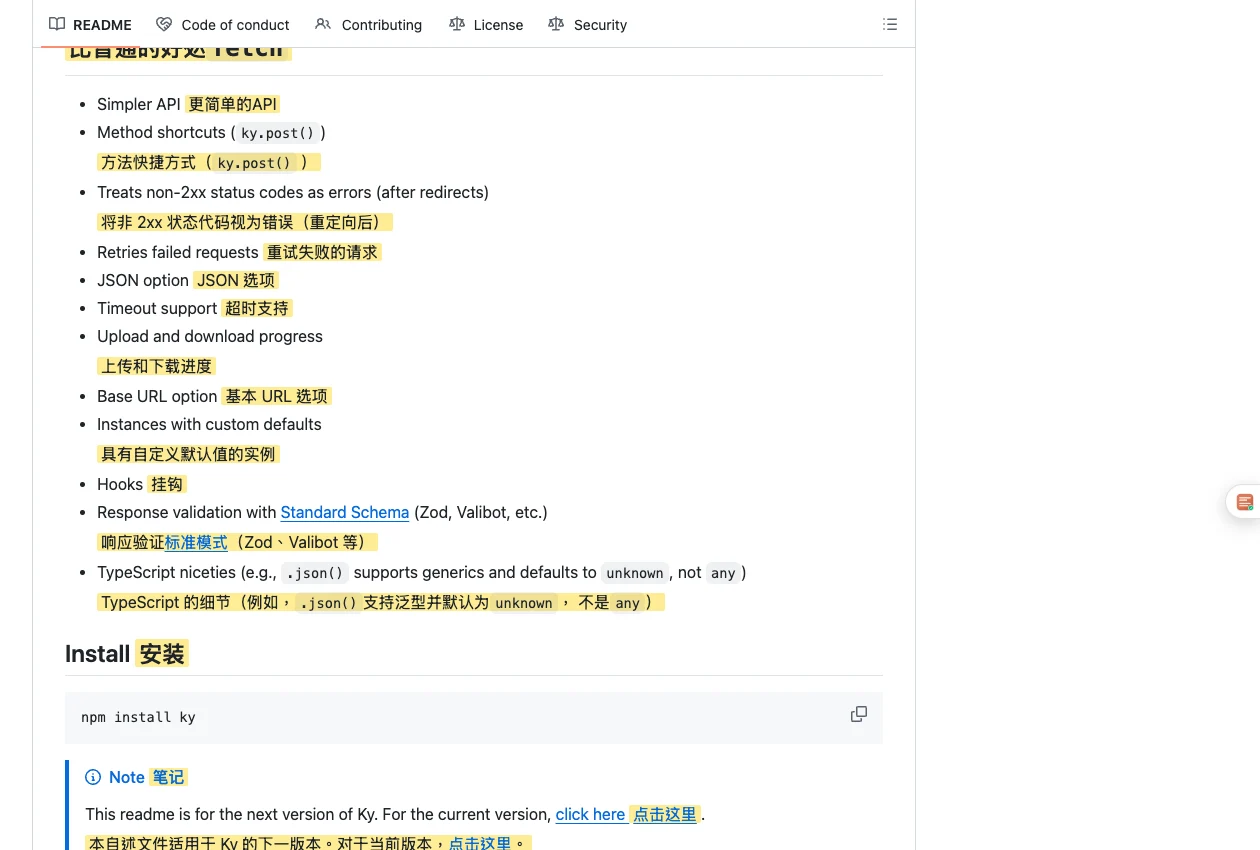
Try the Ky README on GitHub. Scroll to Install so you can compare the text and the npm install ky command before and after translation.
Choose the bilingual display mode
Open the DualTrans popup, set your target language, and select the bilingual layout in the extension settings. Then start page translation from the popup.
Check the translated text and original command
Read the source and translation together. The npm command stays in its original code block. You can still use GitHub’s copy button or select the code directly.
Troubleshooting and common questions
Why did part of the README stay in the original language?
DualTrans skips code blocks so commands and examples remain valid. It translates readable content as it comes into view, so scroll farther down to translate more of a long README.
How do I bring the original paragraphs back?
Switch to the bilingual layout if you previously chose translation-only view, or turn off page translation to restore the page to its original display.